What happens at the edges of your AWS workflows: 3 ways to extend RunMyJobs
Your cloud providers are good at what they do. On AWS, Glue transforms data, Step Functions coordinates serverless workflows and EventBridge routes events. Azure and Google Cloud have their own equivalents, and each one reliably handles the steps inside its own boundary.
The problem is that your most important business processes rarely stay inside one boundary. A month-end report might start with an extract from an on-premises database, pass through several AWS services and finish in a data warehouse that Finance reviews at 8 AM. An invoice might arrive from a supplier, get matched in AWS and need to be posted to SAP before the payment run.
Every service in either chain can report success while the business process still fails. A green Glue job doesn’t prove the source data was complete. A completed Step Functions workflow doesn’t prove SAP received the result. Each service sees its own part of the process, but someone still has to own the whole thing.
RunMyJobs by Redwood provides that enterprise orchestration layer across cloud, SAP, data platforms and on-premises systems. If you already use RunMyJobs, the opportunity is to extend the dependency logic, visibility and controls you trust to cover the processes that now cross into AWS. Here are three places to start.
1. The hybrid data pipeline that starts outside AWS
Picture a common pipeline. Every night, a legacy on-premises system (an Oracle E-Business Suite instance, a plant-floor database or a warehouse management system) exports data. The file lands in Amazon S3, AWS Glue transforms and catalogs it and the results load into Snowflake, where an analytics dashboard refreshes before the business day starts.
Inside AWS, S3 stores the data reliably and Glue handles the transformation at scale. Neither can tell you whether the on-premises extract finished late, arrived partially or never arrived at all.
These failures tend to fly under the radar. A late extract can leave Glue processing yesterday’s data without complaint. A partial file can produce a dashboard that looks plausible but is wrong. And the hardest case is a step that never triggers at all, because there’s no error — just an absence. Someone notices when a report looks stale, often hours or days later, and the investigation starts with a simple question: where did the process break?
Bringing the full chain under RunMyJobs adds the context the individual services don’t have:
- Dependency-based sequencing: The S3 landing, Glue job and Snowflake load wait for the on-premises extract to complete and pass the checks you define.
- One view of the chain: Operators can see status and projected completion without moving between consoles and teams.
- An SLA on the business outcome: RunMyJobs can track whether the dashboard will be ready by 8 AM and warn the team before that deadline is at risk.
- Faster failure identification: When something goes wrong, you know which step failed, or which one never started, without piecing it together across teams and tools.
- Less custom code, less wasted compute: Pipelines run when the data is ready, not on a fixed polling schedule that burns compute checking for files that haven’t arrived.
RunMyJobs doesn’t replace Glue or S3. It governs the process they belong to, including the part that starts outside AWS.
2. The SAP invoice that needs AWS to finish its job
AWS publishes reference patterns to show how its services fit together, and many real projects start from one. A good example uses Amazon AppFlow, Amazon Textract and AWS Step Functions to automate invoice matching against SAP S/4HANA data. It’s a useful picture of the processing inside AWS.
Production architecture also has to account for what surrounds that processing. What starts the workflow? How does it know the SAP data is current? What posts the result? Will the work finish before the next payment run?
Those questions are often answered with custom triggers, scripts and point-to-point integrations that never appear on the reference diagram. That hidden coordinsssation creates the risk of matching against stale SAP data, missing a handoff back to SAP or allowing a payment run to proceed after an overnight failure. It also creates code that has to be retested when SAP or an AWS service changes.
The architecture below adapts the AWS pattern from sales orders to a common accounts payable scenario based on purchase orders and goods receipts. The AWS example matches invoices against sales orders. Here, we use the version most accounts payable teams know as a three-way match, where the invoice, purchase order and goods receipt all have to agree.
The AWS Step Functions connector lets existing Standard state machines be imported as reusable RunMyJobs job definitions and run alongside SAP jobs. The AWS workflow keeps the branching, retries and parallel processing it was built for. RunMyJobs adds the cross-system dependency graph, SLA and operational history around it. Step Functions still owns the matching workflow. RunMyJobs coordinates the work around it as part of the full procure-to-pay process:
- RunMyJobs picks up supplier invoices as they arrive, lands them in Amazon S3 and confirms the batch is complete
- It checks that SAP has finished posting the latest purchase orders and goods receipts, then copies that data into Amazon S3 so the workflow can compare it with the invoices
- It starts the state machine with business context such as company code, period and batch
- It monitors the execution until it succeeds, fails or times out and can stop it if an upstream problem makes the result unsafe to use
- When matching succeeds, it posts the result to SAP S/4HANA through the appropriate standard API using the native SAP connector (with no custom ABAP code)
- It tracks completion against the scheduled payment run’s cut-off and warns the team if the process is at risk of missing it
- It routes invoice exceptions to Accounts Payable and can open a ServiceNow incident when the process threatens the SLA
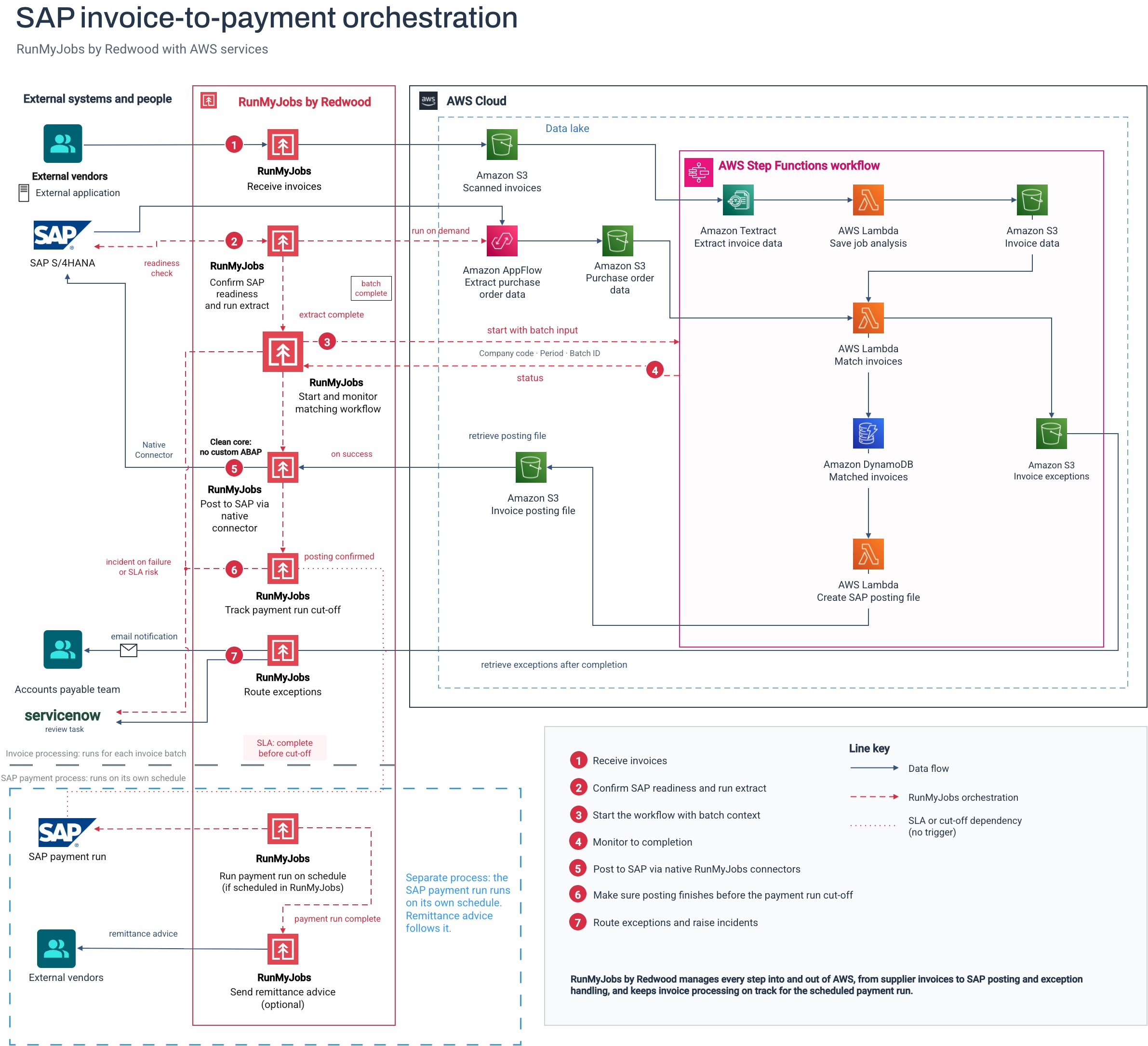
The payment run is usually a separate process on its own schedule, so the architecture treats its cut-off as a deadline rather than the next step. If RunMyJobs also schedules the payment run, some finance teams may choose to hold it when invoice processing fails. That adds control at a critical close and delays correctly posted invoices until the run is released.
This also supports a cleaner SAP core. Pre-built SAP connectors and standard interfaces reduce the custom ABAP and tightly coupled integrations that otherwise accumulate around cross-system processes. RunMyJobs is the only workload automation and orchestration platform that is an SAP Endorsed App and part of the RISE with SAP reference architecture.
3. The reconciliation break that needs judgment, not a queue
The third opportunity starts with a process you may already run in RunMyJobs.
Take reconciliation. The job compares the general ledger with a bank feed or sub-ledger, and it runs reliably at scale: one customer’s reconciliation job runs about 52,000 times a year. When a comparison fails, however, the result may be little more than a red status. Then someone has to pull data from every system involved, find where the values diverged, determine the cause and decide whether to fix the break or escalate it. In a complex reconciliation, that investigation can span as many as nine systems.
That’s skilled detective work, but much of it is evidence gathering. It also gets harder as the process becomes more reliable. Breaks become rarer, so fewer people remember what the usual issue looks like, and each investigation starts cold.
Agent Studio in RunMyJobs lets you build a governed agent and add it to the reconciliation job chain you already have. When a break occurs, the agent:
- Checks the same upstream systems an analyst would
- Proposes the most likely cause
- Resolves a recurring pattern it’s authorized to handle
- Escalates a new or consequential case, with the investigation already attached
Imagine a break shows up at 6 AM on the last day of the month. The bank feed and general ledger differ by a few cents across dozens of lines. Without help, that’s the first hour of an analyst’s day. Instead of asking an analyst to begin with only the fact of failure, the agent can trace the difference to an FX rounding pattern, collect the supporting evidence and either apply an approved resolution or send the worked-up case to a person.
The deterministic reconciliation process still handles every transaction. The agent only acts when a case needs judgment, concentrating AI use on the exception path rather than the full transaction volume. Because the agent runs as a workflow step, it inherits the workflow’s
governance and observability. You define its skills and tools, set timeout and cost controls and decide which patterns it may resolve or must escalate. The audit trail shows what the agent did in the context of the process that called it.
Coming next for the AWS Step Functions connector
The next planned update to the connector would bring:
- Execution results returned to RunMyJobs: Downstream steps could use a completed state machine’s output directly without a separate storage handoff.
- Express workflow support: RunMyJobs could start Express state machines synchronously or asynchronously.
- Express discovery and import: Teams could list Express state machines and bulk-import them as RunMyJobs job definitions, as they can with Standard workflows today.
Where to extend RunMyJobs next
Not every AWS activity needs RunMyJobs in front of it. Start with a business-critical process that crosses a boundary: an on-premises extract feeding AWS, an SAP process waiting on a state machine or an automated job that still hands every exception to a person.
Then ask who owns visibility across the whole thing. If the answer is “nobody,” that’s where to extend RunMyJobs next.
Schedule an AWS orchestration review with a Redwood Software expert to identify where RunMyJobs can add visibility and control across your hybrid cloud workloads.
About The Author

Dan Pitman
Dan Pitman is a Senior Product Marketing Manager for RunMyJobs by Redwood. His 25-year technology career has spanned roles in development, service delivery, enterprise architecture and data center and cloud management. Today, Dan focuses his expertise and experience on enabling Redwood’s teams and customers to understand how organizations can get the most from their technology investments.