What Redwood Insights reveals about your changing hybrid workflows

A successful migration or cloud automation initiative establishes a stable operational baseline, but the environment around it never stands still. Workloads expand, transaction volumes grow and new cloud-native applications introduce different processing dynamics.
You already rely on RunMyJobs by Redwood to orchestrate critical work across your hybrid cloud estate. But as the applications and data platforms tied into those processes evolve, the assumptions behind your original design, such as expected task durations, batch windows and queue capacity, gradually drift.
If you manage IT Operations across on-premises infrastructure, private cloud environments and cloud services, you know that this drift rarely announces itself with an immediate outage. Workflows keep finishing and deadlines are still met, but behind the scenes, those processes become tighter, more brittle and harder to run predictably.
Treating recurring timing delays as isolated incident tickets keeps your team stuck in reactive triage. To safeguard service delivery, shift toward proactive problem management with Redwood Insights. It makes it easy to spot where your post-cloud migration assumptions are breaking down and optimize workflows before an SLA is breached.
Hidden friction
Think about an everyday billing process running across your hybrid IT environment: an export runs from an on-premises data center, an AWS Glue job transforms the dataset and a downstream SaaS billing application ingests the output to generate invoices.
RunMyJobs coordinates the handoffs, and billing finishes by its scheduled deadline. On the surface, the workflow appears healthy. Look at the execution history over six or twelve months, and the dynamics tell a different story. As transaction volumes climb, that AWS transformation steadily creeps from 20 minutes to nearly an hour. Meanwhile, the downstream billing application still requires clean data by 7 AM sharp. What used to be a comfortable two-hour safety buffer between transformation completion and the billing run has quietly evaporated into 12 minutes.
Nothing has failed, but one unexpected retry would use up the remaining 12 minutes and miss the SLA. In the interim, operators compensate with informal workarounds: manually watching queues, checking file arrivals or nudging schedules. That’s just managing symptoms. To fix the underlying problem, you need to understand why the execution pattern drifted in the first place.
What Redwood Insights can tell you
Redwood Insights gives you the forensic context you need for structured problem management instead of guesswork during an outage.
When a critical hybrid workflow starts demanding extra manual attention, you can drill into several operational layers:
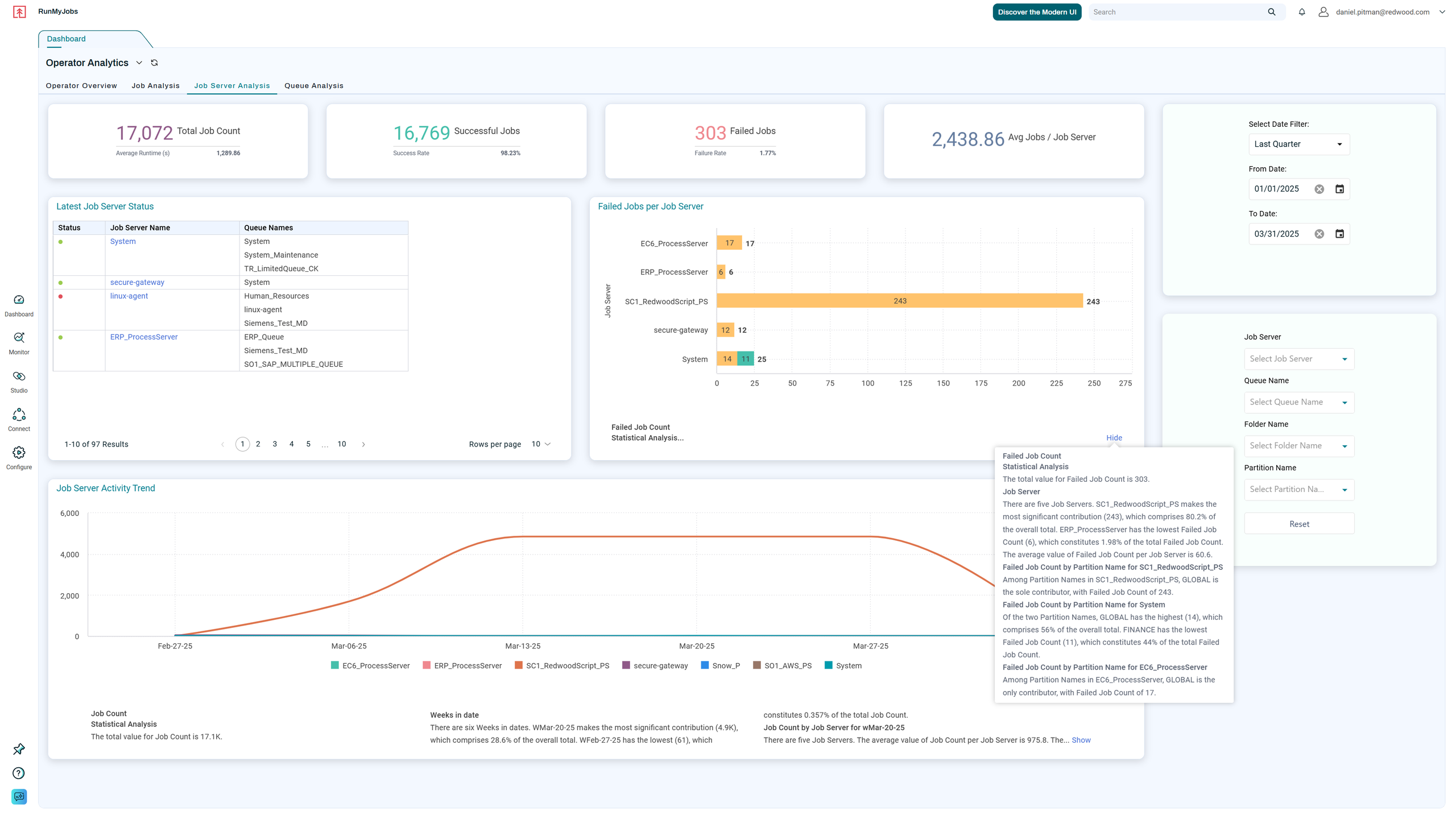
Spot execution trends with Job and Workflow Insights
Move past individual run logs and evaluate historical durations. You can see whether that cloud transformation is slowing down gradually due to data volume, or if it experiences erratic runtime spikes on high-volume days.
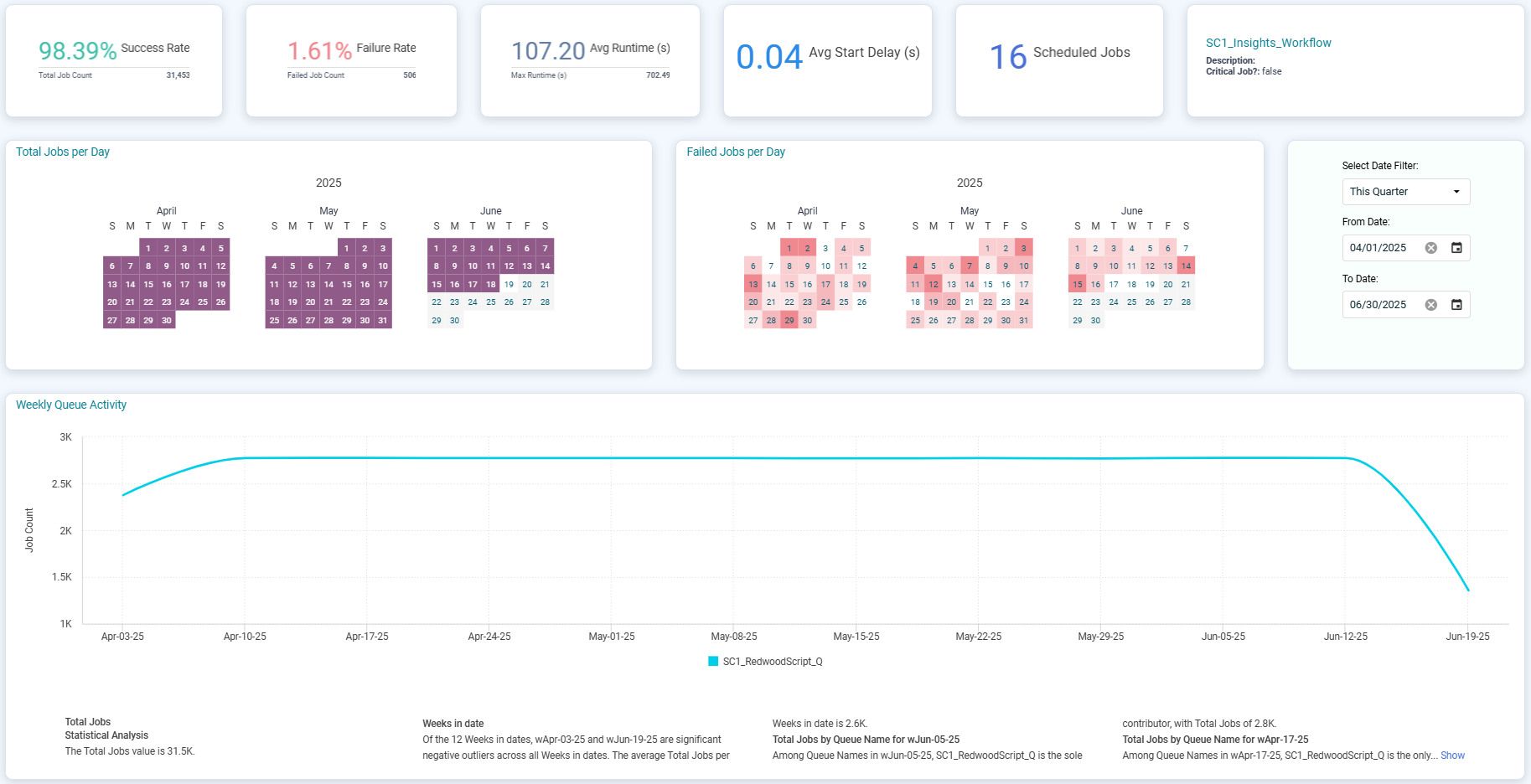
Isolate patterns with heat maps
Visual heat maps reveal whether delays, retries or execution spikes cluster around specific times, such as month-end close or peak AWS processing windows.
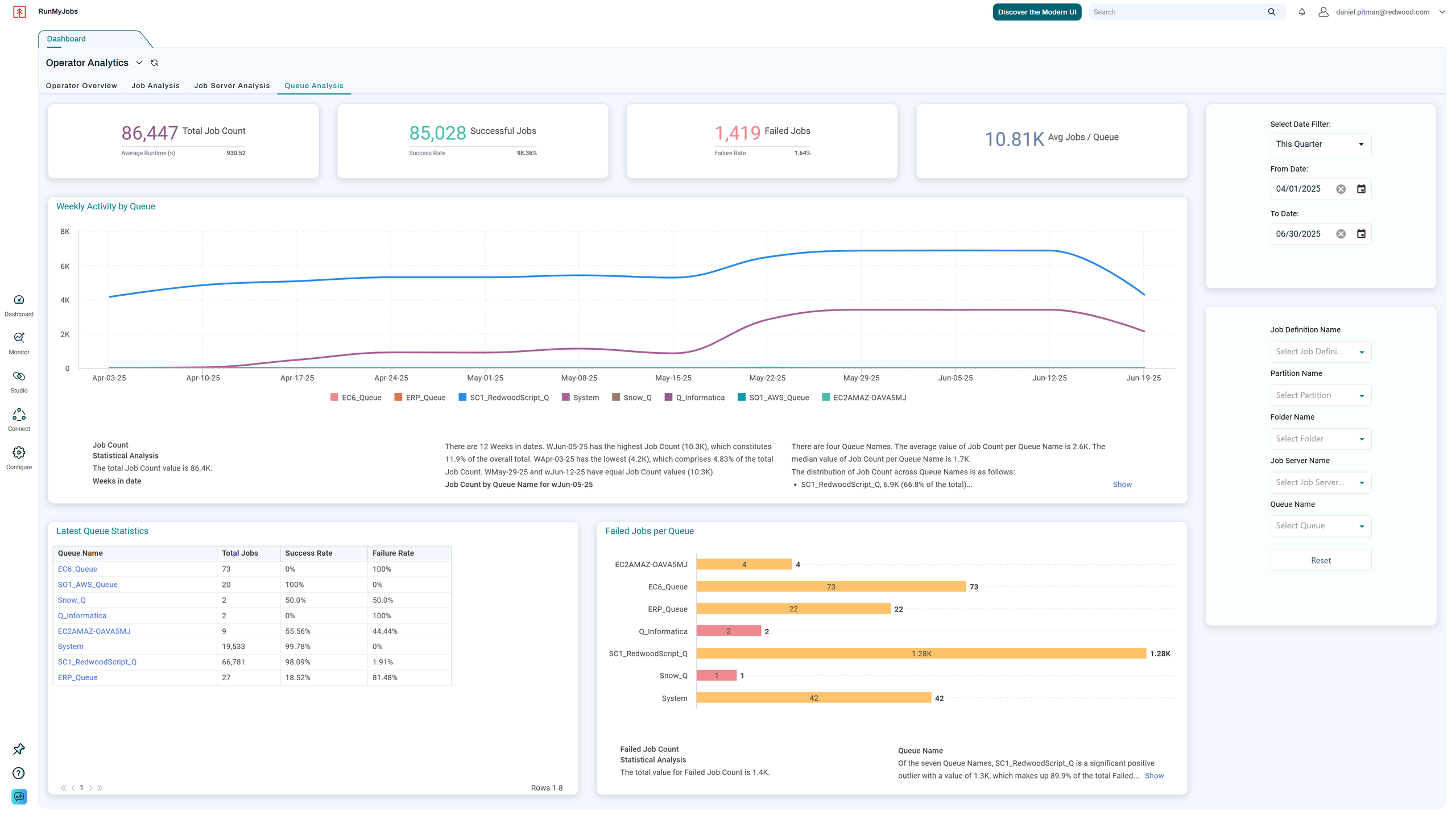
Uncover contention with Queue and Job Server Analysis
If a job spends more time waiting than running, the workload itself may not be the issue. Queue analysis shows whether multiple data pipelines are competing for the same server resources or hitting concurrency caps.
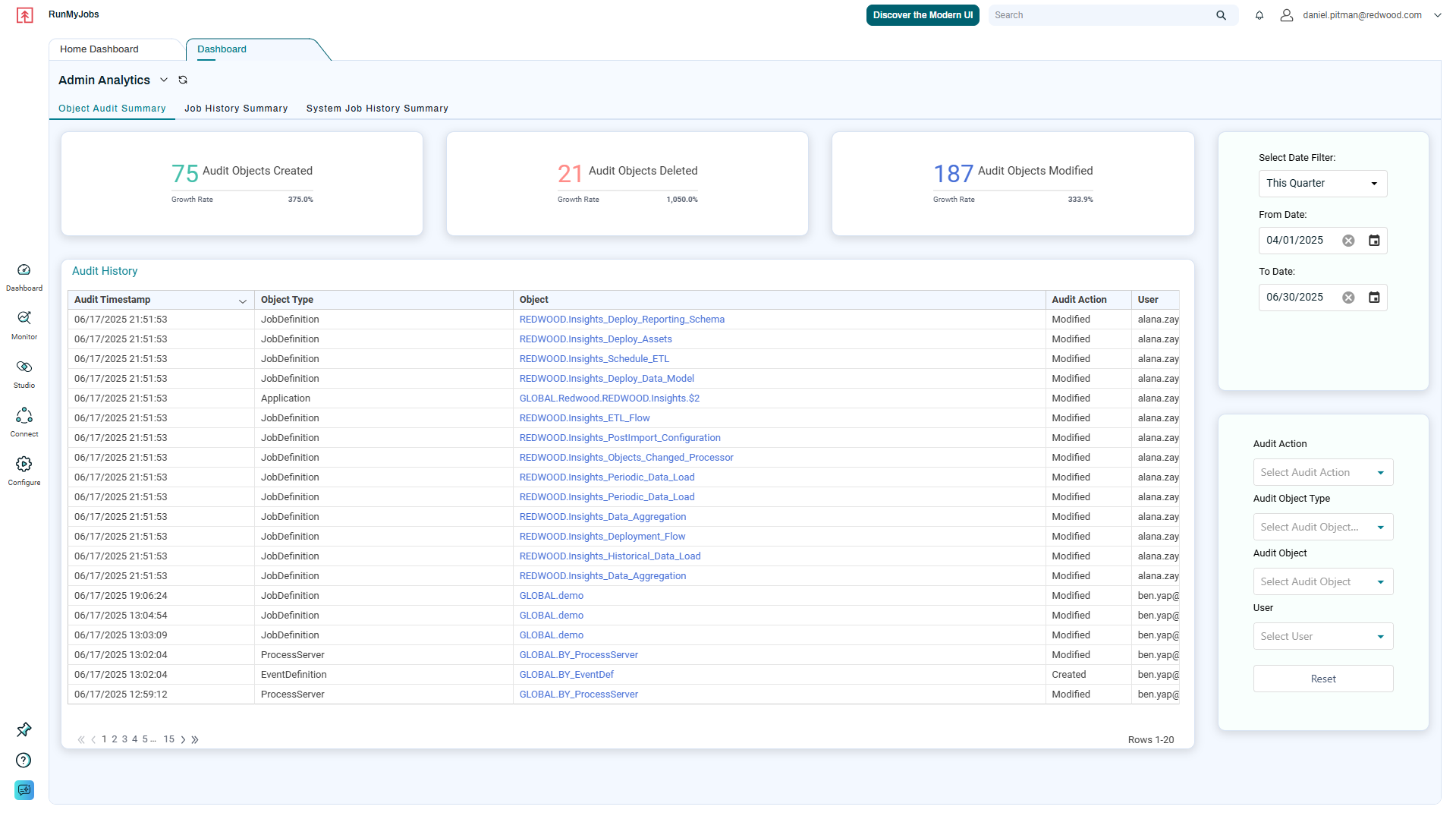
Audit configuration changes with Object Change History
If performance shifted after an update, review the object change history. You can cross-reference timing anomalies against recent modifications in calendars, dependency criteria or job configurations to confirm what changed.
Need a dedicated view for process owners?
With Redwood Insights Premium, you can build custom dashboards focused specifically on an individual, critical process, like this billing workflow.
Through Redwood Insights and RunMyJobs UI customization, you can give secure, tailored access to the business, application and digital teams responsible for the SaaS platform or the overall business outcome. Instead of answering frantic status pings about whether morning data will land on time, process owners get clear, self-service visibility into their workflow’s health, backed by 15 months of historical data to track long-term performance trends.

Using Splunk? RunMyJobs’ Data Stream can send active and completed job execution data directly to Splunk at configured intervals. By streaming job history through the Splunk HTTP Event Collector (HEC) without custom scripting, your platform administrators can investigate RunMyJobs activity right alongside the application and infrastructure data you already collect there.
That makes it simple to correlate workflow delays with underlying system events like database lockups or host CPU saturation.
Turning insights into targeted orchestration fixes
Observability delivers value when it guides concrete corrective action. Once Redwood Insights highlights which operational assumptions no longer hold, you can use the orchestration capabilities already built into RunMyJobs to resolve the root cause.
If a workflow was originally padded with a fixed 30-minute delay “just in case” upstream data was late, you can eliminate the static clock entirely. By switching to event-driven triggers using native connectors for Amazon S3 or Amazon EventBridge, the downstream billing job launches the millisecond the file is validated, handing valuable minutes back to your schedule. If queue analysis pointed to capacity contention during overnight processing, you can rebalance queues across job servers or adjust concurrency limits so that background data syncs never choke critical financial runs.
Often, that investigation also reveals steps that still sit outside your primary workflow, like an unmanaged script preparing data or an isolated cloud task. Bringing those unmanaged workloads under RunMyJobs orchestration gives you end-to-end visibility and eliminates the manual handoffs between systems.
Visibility into actual run windows also supports cloud cost optimization and FinOps initiatives. Instead of leaving AWS EC2 instances running 24/7 just to handle intermittent batch tasks, you can orchestrate resource provisioning directly within RunMyJobs to spin compute up when work arrives and terminate it when execution wraps up.
Finally, enabling predictive SLA monitoring ensures that the platform projects completion times in real time, alerting your team or even taking corrective action automatically by running or modifying jobs while upstream tasks are still running so you can intervene long before a business cutoff is threatened.
Keep your operating model current
Your hybrid cloud estate will continue to evolve. Application teams will roll out new cloud-native services, business requirements will change and transaction volumes will scale.
Reassessing your hybrid workflows shouldn’t be an emergency drill triggered by an executive escalation. By making workload observability an integral part of ongoing problem management, you can proactively eliminate technical debt, safeguard business SLAs and ensure your cloud automation foundation remains resilient as your environment grows.
Ready to evaluate your current execution paths and see where extending RunMyJobs can eliminate hybrid bottlenecks? Schedule an AWS orchestration review with a Redwood expert.
About The Author

Daria Rieznik
Daria Rieznik is a Product Manager for RunMyJobs at Redwood Software, where she looks after the product roadmap and core functionality, including the scheduler and Redwood Insights. She started out in QA in 2010 and moved into product management in 2020, giving her a firsthand understanding of how product decisions shape the user experience. What drives her is simple: building products that are genuinely useful and take the headache out of the everyday automation challenges Redwood’s customers face.