RunMyJobs and AWS Step Functions: Orchestrating across SAP and AWS
For teams running SAP alongside AWS, the hardest part of a cross-system process is the handoff. Here’s how RunMyJobs by Redwood and AWS Step Functions share the work, including two integration patterns: cross-account RISE with SAP access and a forecasting walkthrough.


Introduction
Most enterprise data that ends up in AWS, or passes through it, starts somewhere else, often in a system with its own scheduler and its own idea of when data is ready:
- ERPs: An SAP background job, scheduled in SM36, extracting nightly sales and stock data for demand forecasting, or an Oracle E-Business Suite or Fusion period close feeding a finance data lake
- Mainframes: A nightly z/OS batch run producing transaction files for fraud analytics or regulatory reporting
- Partner file transfers: Supplier or bank files arriving over SFTP, where nothing should start until the file arrives and passes validation
- SaaS applications: HR or CRM data exported from Workday or Salesforce for workforce or sales analytics
AWS Step Functions handles the AWS part of these journeys well, sequencing AWS services with built-in retries, error handling and execution history.
Here, we’ll cover orchestrating across the AWS environment boundary using a daily forecasting-and-replenishment example with both SAP and AWS.
Where Step Functions stops and SAP begins
Step Functions can reach SAP endpoints. It can extract data through SAP’s ODP framework, and the AWS SDK for SAP ABAP lets ABAP code call Step Functions directly. Many joint customers use all of these.
None of them runs SAP’s job layer: background jobs scheduled and monitored over SAP’s External Interface for Background Processing (XBP), SAP Business Warehouse (BW) process chains with their own restart behavior, job interception and SAP Computing Center Management System (CCMS) events. A replenishment run is a sequence of those jobs, with dependencies, variants, business calendars and restart rules. In many large organizations, it also spans several SAP systems, plus non-SAP sources and hundreds of files. Much of how these fit together lives in a few experts’ heads and isn’t written down.
That holds even when SAP runs on AWS. Hosting SAP on Amazon EC2 or in RISE with SAP puts it on the same platform, but Step Functions still can’t start an SAP job or read its status without custom code. Each additional system adds more brittle retry logic, hard-coded configuration and error handling, which raises the risk of failures and makes incidents harder to resolve.
Teams that bridge this gap with custom code and workarounds run into four recurring problems:
- Siloed teams have no shared control point. In global IT organizations, the SAP automation team and the AWS infrastructure team often sit in different departments. Each sees half the process, so when orders are late, nobody can see where the run is stuck.
- Polling raises false positives and hits execution limits. By default, a Step Functions workflow waits for SAP data in a loop; checking every minute for six hours means more than a thousand state transitions and hundreds of AWS Lambda invocations per run. The loop can hit its retry limit or time out, resulting in false positives, which waste time and train operators to ignore alerts.
- Scheduling needs more than cron. Amazon EventBridge Scheduler handles time zones, and AWS cron can express “last day of the month” or “nearest weekday.” But global processes need more: country-specific holiday calendars, trading calendars, quarter-end variants and calendars shared across hundreds of processes. In pure AWS terms, that means custom Lambda logic and a calendar table someone has to maintain: a hard-coded configuration that can break whenever a time zone or business rule changes.
- RISE with SAP on AWS crosses account boundaries. RISE with SAP Cloud ERP Private environments on AWS run in AWS accounts that SAP owns and manages, while customers keep their own accounts for data lakes, analytics and integration. Every process that moves data from RISE into customer resources crosses an account and network boundary, adding identity, networking and ownership questions to each integration.
Bridging SAP and AWS with RunMyJobs
RunMyJobs by Redwood is a SaaS orchestration platform and SAP Endorsed App, Premium certified, and it’s the only workload automation and orchestration platform that’s part of the RISE with SAP reference architecture. Its SAP connector schedules and monitors jobs, runs and monitors process chains, intercepts SAP jobs for central control and synchronizes events.
RunMyJobs doesn’t replace Step Functions, which remains the right engine for AWS-native workflow logic. AWS teams keep building state machines as they do today, and running a Service Orchestration and Automation Platform (SOAP) above them brings several benefits:
- One workflow for the whole process: SAP jobs and Step Functions state machines are steps in the same workflow designer, with workflow and business logic codified in one place.
- Minimized technical debt: Pre-built connectors and job templates replace custom scripts, polling loops and hard-coded configuration, reducing integration code and risk across the workflow.
- Business-aware execution: Runs start when their data is ready, and the business calendar allows it, triggered by events rather than a timer.
- State-aware from end to end: The workflow tracks the real status of every SAP job and AWS execution, so each step waits, retries or stops based on what actually happened, and all teams share the same end-to-end status, SLA monitoring and audit trail.
- SAP process depth: The AWS side never has to deal with SAP’s Remote Function Call (RFC) interface or job variants.
The connection point is the RunMyJobs AWS Step Functions connector. It imports state machines from your AWS account as reusable RunMyJobs job definitions, starts them with business context, monitors them to completion and returns their output to downstream steps, for both Standard and Express workflows.*
Reference architecture
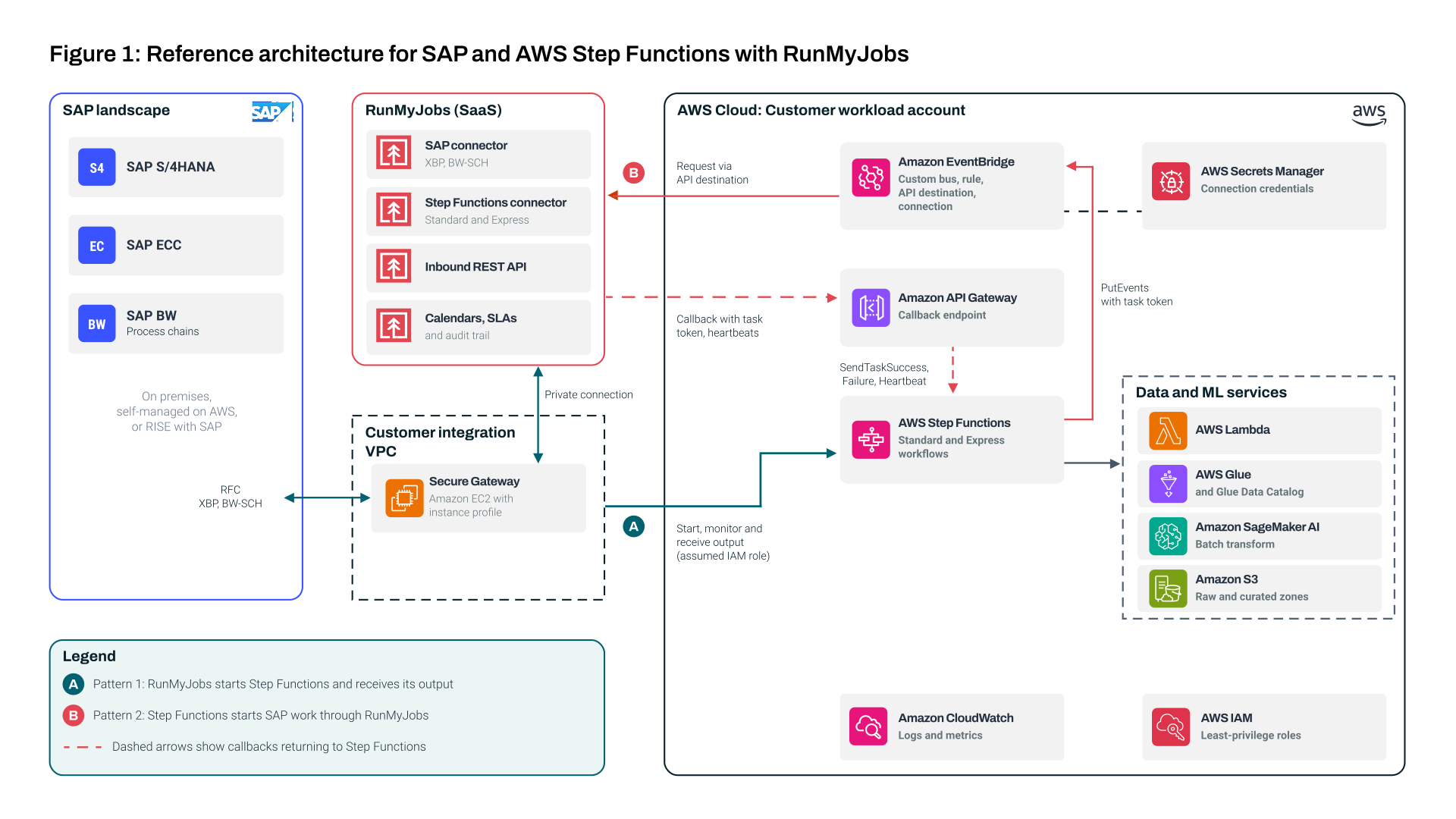
The architecture follows the AWS Well-Architected Serverless Applications lens: use a state machine instead of chaining functions in code, and trigger work from events instead of polling. Figure 1 shows its three layers.
- SAP: SAP S/4HANA, ECC or BW, on-premises, self-managed on AWS or in RISE with SAP. RunMyJobs connects over RFC using the XBP and SAP Business Information Warehouse Scheduler (BW-SCH) interfaces, so nothing on the AWS side talks to SAP directly.
- Orchestration: RunMyJobs runs as SaaS, with a lightweight Secure Gateway on Amazon EC2. The gateway’s EC2 instance profile lets RunMyJobs use temporary credentials and an assumed IAM role, with no long-lived access keys.
- AWS workloads: Step Functions orchestrates Lambda, Glue and SageMaker AI to load the data lake in Amazon S3 and produce forecasts.
RISE with SAP cross-account variant
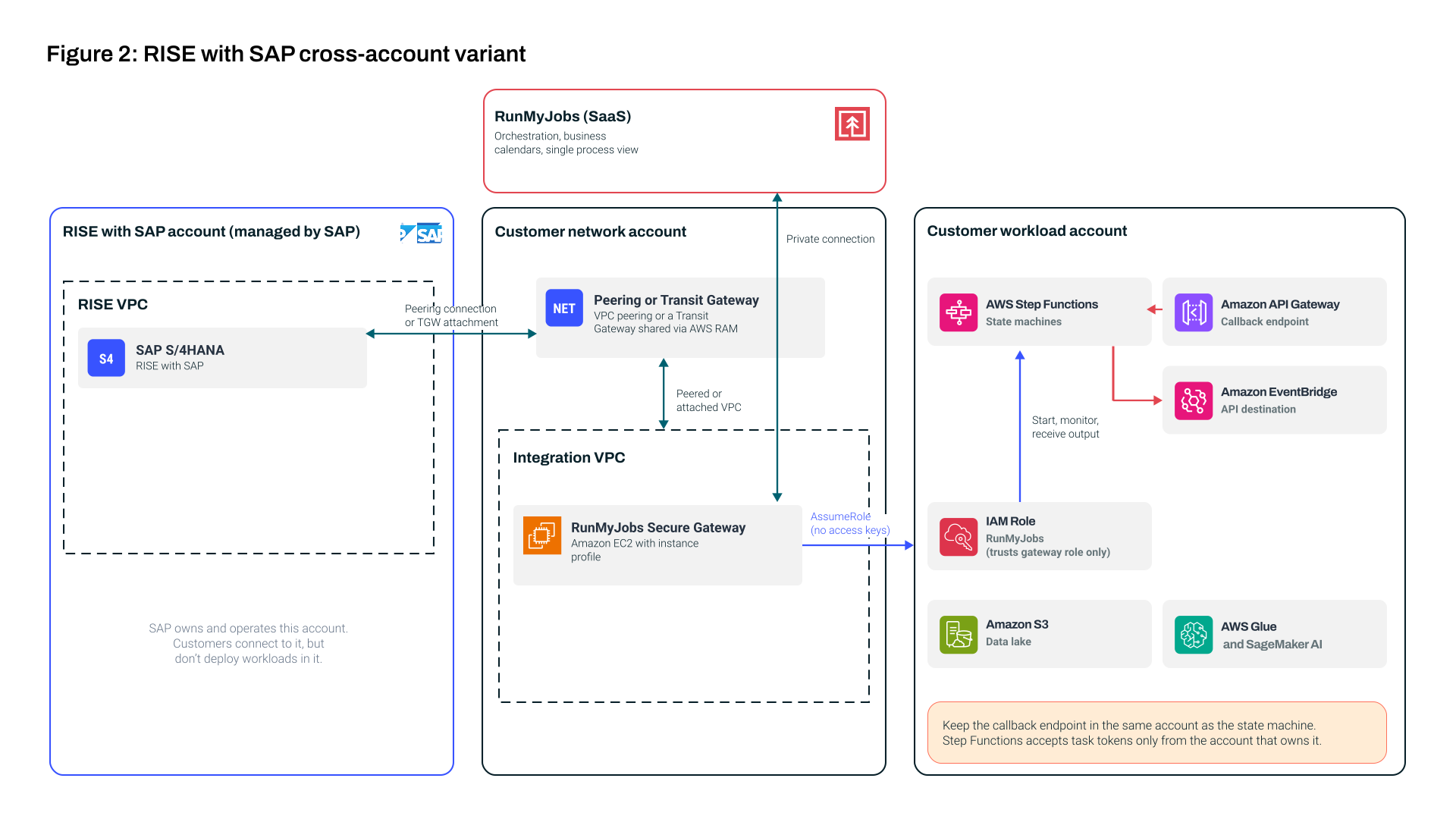
Figure 2 shows how customers connect to RISE through VPC peering or a Transit Gateway they own. With peering, the Secure Gateway sits in the VPC peered with RISE, because peered traffic can’t pass through to other VPCs.
With RISE, SAP owns the AWS account that runs your SAP systems. AWS documents several ways to connect to it. For enterprises with a multi-account landing zone, the most common is a Transit Gateway that you own and share with the RISE account through AWS Resource Access Manager; SAP then attaches the RISE VPC on its side. Smaller environments can use VPC peering instead.
Three design points matter here:
- Keep Step Functions and its callback endpoint in the same account. Step Functions only accepts callbacks from the account that owns the state machine, so the API Gateway endpoint belongs in the workload account, not a shared network account.
- Use roles to cross accounts. The Secure Gateway reaches the workload account by assuming a role there. Because the gateway runs in your account with your own instance profile, the role can trust that gateway role alone, and no long-lived access keys are needed.
- Separate network ownership from workload ownership. The network team owns the connection to RISE and the integration VPC, application teams own their state machines and RunMyJobs gives both the same process view without either needing access to the other’s account.
Two integration patterns
We need both directions for this workflow: SAP-led processes that hand off to AWS and AWS-led processes that need SAP work along the way.
Pattern 1: RunMyJobs starts Step Functions
RunMyJobs runs the SAP side of the process, then starts a state machine through the connector and continues once the execution completes:
- Imported state machines become steps in the RunMyJobs workflow, next to the SAP jobs they depend on
- RunMyJobs starts the execution with business context, such as the region and business nuances
- For Standard workflows, RunMyJobs monitors the execution until it finishes and can stop it if an upstream problem occurs
- For synchronous Express workflows, RunMyJobs waits for the result inline, which suits short checks. For asynchronous Express workflows, it starts the execution and moves on, which suits high-volume event processing*
- The output comes back to RunMyJobs, so downstream steps can use values as parameters
Because the SAP job and the execution are steps in one RunMyJobs workflow, the state machine starts only once its input is in S3.
Pattern 2: Step Functions starts SAP work in RunMyJobs
Sometimes the AWS workflow is in charge and needs SAP to act:
- A task publishes an event to a custom EventBridge bus naming the RunMyJobs job, its parameters and a task token; then the workflow pauses
- An EventBridge rule routes the event to an API destination, which calls the Inbound REST API over HTTPS; the destination’s connection keeps the RunMyJobs API key in Secrets Manager and its rate limit stops bursts from overwhelming RunMyJobs
- RunMyJobs submits the SAP job or job chain, passing the task token along as a job parameter
- When the SAP work finishes, RunMyJobs sends the task token and result to an Amazon API Gateway endpoint, which passes them straight to Step Functions with no Lambda function in between, and the workflow resumes
| HTTP task | Event with callback | |
|---|---|---|
| Waits for a long SAP job? | No; 60-second limit | Yes; pauses until the callback arrives |
| Throttling protection | Retries configured in the workflow | Built-in rate limit and up to 24 hours of delivery retries |
| Coupling | Direct call | Decoupled; the same event can also feed audit or other consumers |
| Best for | Status lookups, quick submits | Starting SAP processes that take real time |
Callbacks require a Standard Step Functions workflow.
Putting it together: Daily forecasting and replenishment
Figure 3 below shows how both patterns combine in a real process. The diagram and walkthrough use a single SAP system for readability, but the same patterns apply across several SAP instances and non-SAP systems.
An international retailer with thousands of stores forecasts demand for about 30,000 products every night. Sales and stock data come from SAP, forecasting runs in AWS and SAP turns the forecast into orders, which must reach suppliers and distribution centers by 05:00 local time. For fresh products, a late or wrong order means empty shelves or waste.
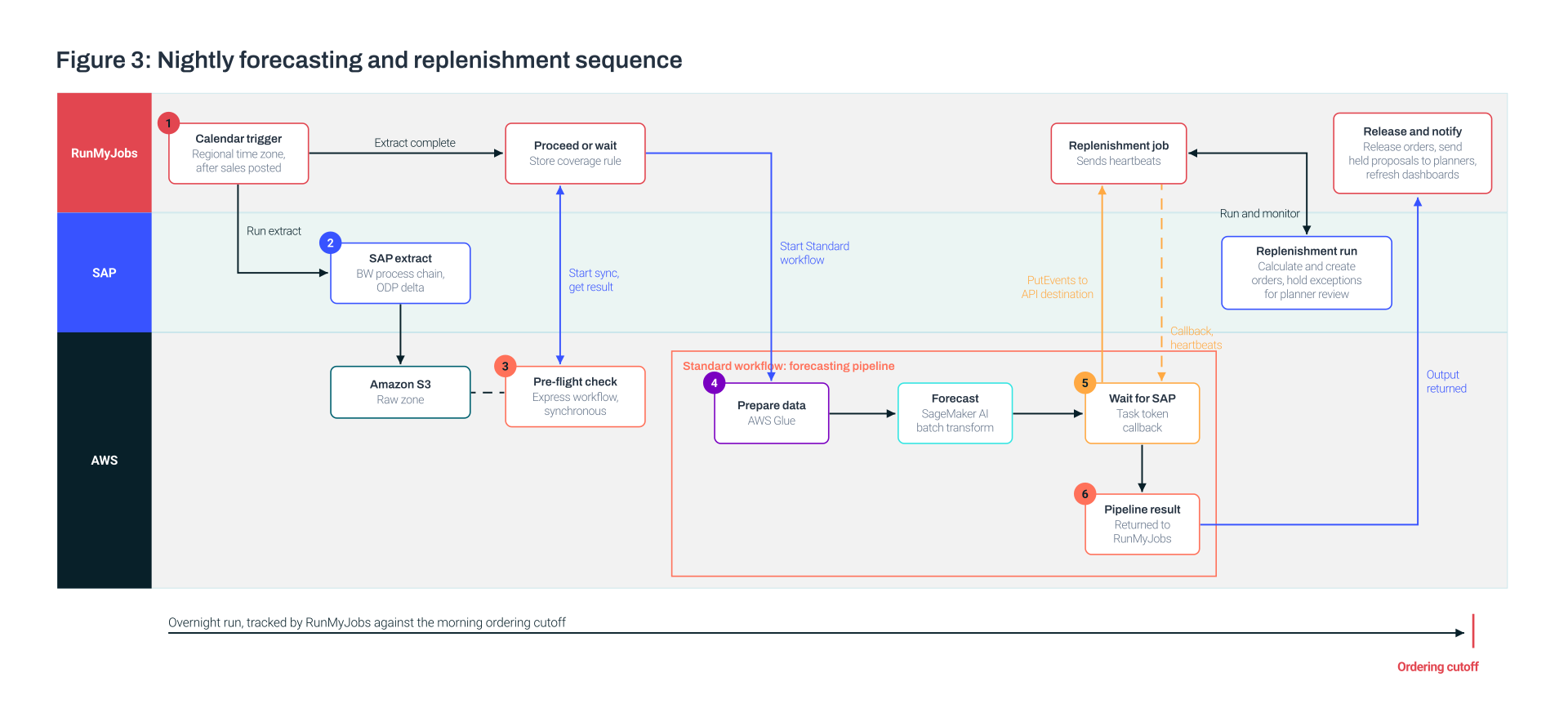
Step 1: Schedule on the business calendar
Each region gets its own run, scheduled in RunMyJobs, so the UK and Central Europe runs start after their last stores close.
The schedule follows the retailer’s trading calendar: it skips days when distribution centers don’t take deliveries, allows for country-specific public holidays and adds an extra run in peak weeks such as the run-up to Christmas.
The run also waits for SAP. It starts only when the day’s point-of-sale data is posted, and if posting runs late, it waits rather than starting on time with half a day’s data.
Step 2: Run the SAP extract
RunMyJobs runs the SAP side over XBP. An SAP BW process chain loads the day’s sales, then an extract pulls sales history, stock on hand and promotions, using SAP’s change tracking (the ODP delta mechanism) to take only records changed since the last run, which keeps each night’s load small.
RunMyJobs tracks each SAP job to completion, keeps its logs and restarts failed steps with SAP-aware rules. The extract lands in the raw zone of the data lake in S3.
Step 3: Run a quick pre-flight check
Before the long pipeline starts, RunMyJobs runs an Express workflow.* One Lambda function checks that every store in the region has reported, row counts match what SAP sent and no product master data is missing.
If stores are missing, a business rule applies: RunMyJobs waits for late stores, then proceeds and flags any still missing to planners. No forecasting compute is spent until that’s settled.
Step 4: Run the forecasting pipeline in Step Functions
RunMyJobs then starts the forecasting pipeline, which runs in two stages:
- Prepare the data. A Glue job combines sales history, stock levels, promotions and calendar features into a forecasting dataset and updates the Glue Data Catalog.
- Generate the forecast. A SageMaker AI batch transform job runs the retailer’s demand model and writes forecasts for every product and store.
In production, each stage is usually a pipeline of its own. They’re kept simple here because the focus is how forecasting fits into the end-to-end run, not how to build the model. For full forecasting implementations on SageMaker AI, see how Novartis and Axfood built theirs.
Step Functions waits for the Glue and SageMaker AI jobs natively, so the workflow has no polling loop.
Three design choices keep failures clear and contained:
- Named failure states: Business failures end in named error states, such as “data preparation failed” or “forecast failed,” each with a cause that RunMyJobs uses to route the failure to the right team.
- One retry layer per failure type: The state machine retries transient AWS errors, like Glue concurrency limits, and RunMyJobs owns SAP job restarts, so no failure is retried in both places.
- Pass pointers to data: Steps exchange S3 locations and identifiers, never the data itself, which keeps the workflow well within Step Functions payload limits.
Step 5: Turn the forecast into orders in SAP
With the forecast ready, SAP takes over. This is Pattern 2 in action.
The state machine publishes its request and pauses. A request that can’t be delivered waits until operators fix the cause and resend it, so no order request is lost during an outage.
RunMyJobs then runs the SAP job chain: it loads the forecast, runs the replenishment calculation and creates purchase orders for suppliers and stock transport orders for distribution centers. Proposals outside normal limits, such as unusually large orders, are held for planner review instead of being created automatically.
When the SAP jobs finish, RunMyJobs sends the callback with how many orders SAP created and how many proposals it held, and the pipeline resumes. If they fail, RunMyJobs reports the error and job ID, and the pipeline moves to its alerting path.
Two safeguards catch a callback that never arrives:
- Heartbeats: RunMyJobs sends regular heartbeats while the SAP jobs run. The workflow fails within minutes instead of waiting out its full time limit.
- An overall timeout. Set well ahead of the 05:00 cutoff, it caps the step’s duration even while heartbeats continue, so planners still have time to act.
Step 6: Hand the result back to RunMyJobs
When the pipeline finishes, RunMyJobs uses the values from step 5 to release orders to suppliers, send held proposals to category planners and refresh the replenishment dashboards.
All night, RunMyJobs tracks the run against the 05:00 cutoff, so operations find out while there’s still time to recover. The execution ARN goes into the job history, so anyone investigating later can jump straight to the Step Functions execution graph.
Security and permissions
Each component gets only the access it needs:
- The state machine’s execution role covers only its own Glue and SageMaker AI jobs, Lambda functions, data lake locations, event bus and alerts
- The role RunMyJobs assumes can only list state machines and run the replenishment workflows, and trusts only the Secure Gateway
- The API Gateway callback can only report task results and heartbeats to Step Functions
- Credentials for calling RunMyJobs sit in Secrets Manager and belong to a dedicated RunMyJobs user that can submit only this process’s jobs
Why this design works
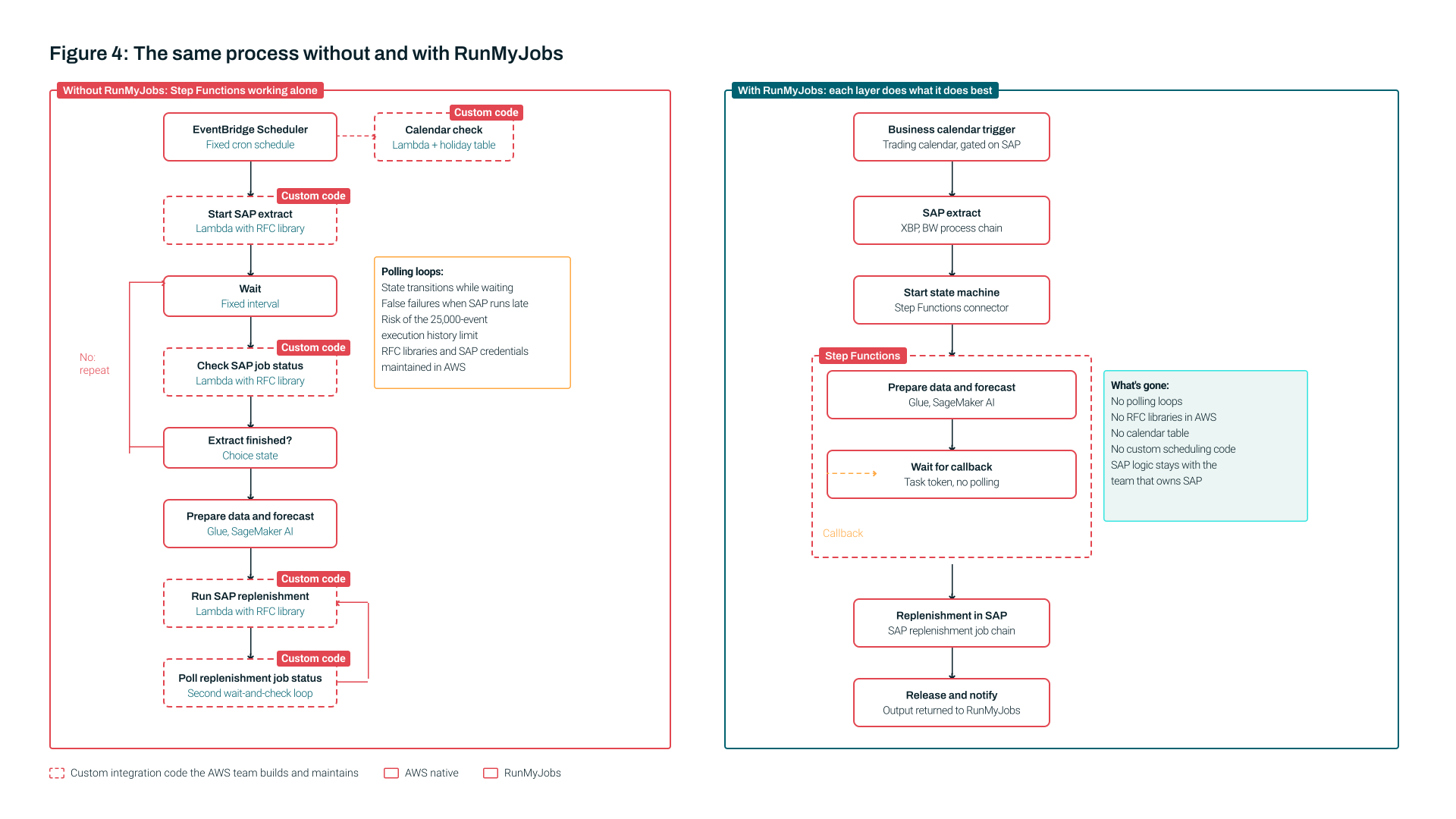
Figure 4 compares the process with and without RunMyJobs. Without it, the AWS team builds and maintains polling loops, RFC client code, a calendar table and custom scheduling functions. With it, none of those exist on the AWS side. The AWS team owns standard state machines, the SAP team owns standard SAP jobs and process chains and RunMyJobs connects them.
The design also works around the limits described earlier:
- No polling, no payload limits: The state machines never poll, so they spend no time waiting, keep within the execution limit and pass S3 locations instead of data.
- Outages are absorbed: If RunMyJobs is unavailable for an hour, EventBridge holds and retries the requests.
- Narrow access between accounts: The customer owns the connection to RISE (VPC peering or a Transit Gateway) and its routing.
- Full SAP depth through one connector: Step Functions gains XBP job control, job interception, SAP BW process chain monitoring and restart, CCMS event synchronization and certified RISE with SAP integration — none of it rebuilt in AWS.
- One view and one audit trail: RunMyJobs shows the run end to end across SAP, AWS and beyond. When questions arise, the answer is in one place.
Getting started
If you already run RunMyJobs and Step Functions, start small:
- Pick one SAP-to-AWS handoff that relies on polling or a fixed-time cron schedule today
- Import the state machine through the Step Functions connector and place it after the SAP job it depends on
- Remove the polling loop from the state machine
Then add Pattern 2 wherever AWS workflows need SAP work, and move schedules onto RunMyJobs business calendars.
To see the AWS Step Functions and SAP connectors in action, request a demo. Install the connectors and job templates from the RunMyJobs Connector Catalog.